
The alert reaches you right away
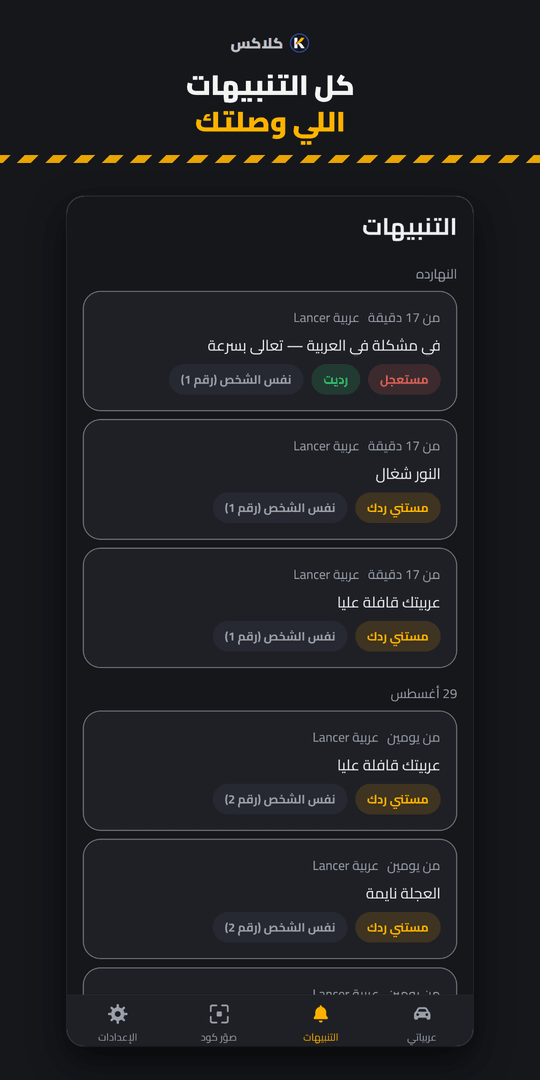
A push notification on your phone right away, on every device signed in to your account.
Tap a message on the phone of the person standing at the car, and watch it reach the owner.

Pick a message
Waiting for an alert… pick a message on the other phone
You reply with one tap, and it shows up on their page.
Want the real thing? Point your phone camera at the code on the sticker, or open the demo car’s page. Open the demo car
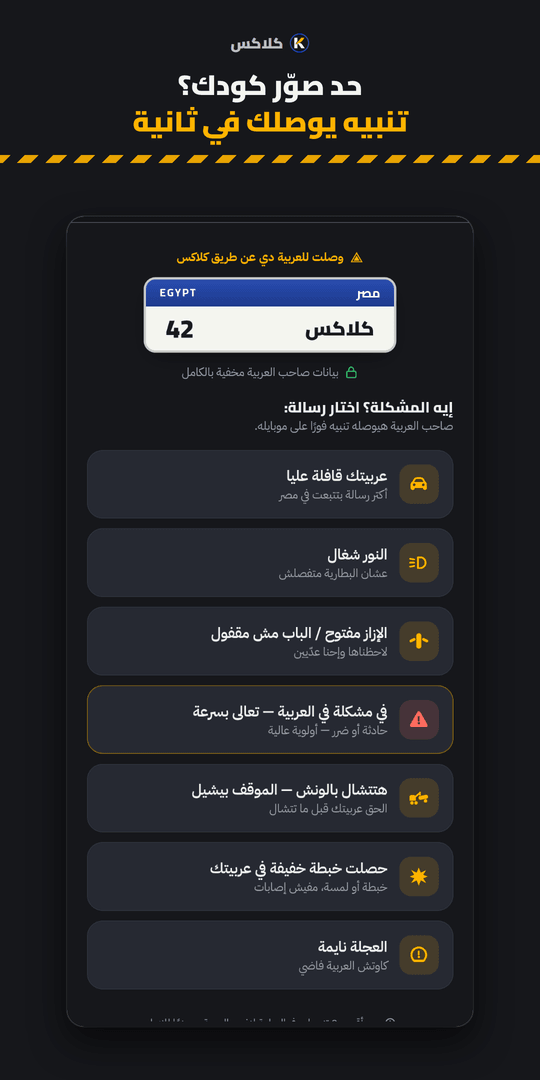
Real screens from KLAKS: the page anyone who scans the code lands on, and the alerts exactly as they reach you.
The whole idea is that someone can reach you at your car without learning a thing about you.
Sees
Never sees
Sees
Never sees
Just a random code — no name, no plate number, nothing that points back to you. If someone abuses it, you regenerate the code with one tap and print a new one.
Three ready-made sticker designs, and you can draw your own.
We collect the least data we can and give you the right to erase all of it whenever you want — in line with Egypt's personal data protection law.Read the privacy policy
Three steps, once, and it costs nothing.
Sign up, add your car, and download the print-ready sticker file from the car's page.
On the front windshield, code facing out. The file also has a mirrored version if you prefer to stick it from the inside.
Whoever scans the code picks a ready-made message, and it reaches you right away — without ever learning your number or your name.
A push notification on your phone right away, on every device signed in to your account.
Download the file and print it anywhere. Ready-sized, with a normal and a mirrored version.
Pause every sticker with one tap while you're away, and switch them back on when you return — same printed sticker.
It runs in the browser on any phone, and you can add it to your home screen like any app.
Same account, same sticker in all three — pick what fits.
Open KLAKS in your phone’s browser and use it right away. From the browser menu pick “Add to Home Screen” and it gets its own icon and opens like any app.
Start in the browser nowThe App Store app is coming soon. Until then, open KLAKS in Safari and add it to your Home Screen — it works the same way.
Tap any question to open the answer.
Yes. Signing up is free, and you download and print the sticker yourself for free. No subscription, no card number.
Not at all. A web page opens for them with ready-made messages, they pick the one that fits and send it — no sign-up, nothing to install. The page expires by itself after an hour. Blocked in right now? Here are the practical steps.
Never, unless you choose to. The page carries no name, no number and no plate, and the sticker itself is just a random code. Every exception is yours to switch on and every one is off by default: you can show the last two digits of the plate so whoever is at the car can confirm it is the right one, and you can turn on a contact card that shows your name, your job or a number to reach you. Otherwise nothing about you appears.
The type of message and the time, and that is all — never who you are or your number. Anything beyond that is your choice: you can write your name with any message, and you can leave your number with any message if you want to be called back. Both are optional, both reach that owner only, are stored encrypted, and are deleted automatically after 30 days. If they reply, the reply appears on the same page, with neither of you learning a thing about the other. If you want a notification when they do, tap «Notify me when they reply» once: no account, this device only, for any alert you send from it, for up to 30 days after your last alert — and you can turn it off at any time from the same page.
With a Google account — that is the only way in. We never take your phone number at all. The alert reaches you as a notification on your phone right away.
On the car's page tap “Regenerate the code”: the old code stops working for good and you print a new sticker. You can also pause the sticker, or cap how many messages one person can send you per hour.
The help center has more on the sticker, notifications and vacation mode. And if you need a person to answer, email us.